
Home / Buying guide
Use a Hoobuy find to place a complete order
Keep the product and options together as you move from browsing to purchase, warehouse inspection and shipping.
Choose the guide you need
See the ordering steps on screen

How to use Hoobuy Spreadsheet
Use the homepage search for a product type, style or brand, or browse a category when you want to compare ideas. Adding a colour or item type can make a broad search more useful.
Save the original seller URL for each candidate, with the size, colour and quantity you want. If you are comparing several similar listings, note the selected price and the question you still need answered.
A useful spreadsheet site keeps its links usable, shows when guides were reviewed and explains costs and after-sales decisions. Check a few products yourself; a long list of finds is not a substitute for those details.
Browse the product categories →How to choose a seller
Open the original product page before deciding. Look for the shop, recent item-specific feedback and a clear size chart. Reused photos can hide differences between sellers, so compare the materials, measurements and included pieces as well as the image.
For clothing, compare chest, length and sleeves with a garment you own. For shoes, use the seller’s chart and request a relevant measurement if needed. For bags, check capacity, dimensions and whether the pictured strap is included.
Select the colour, size or model and read the resulting price. Check whether a cheap option is an accessory, a deposit or a preorder. For 1688 listings, confirm the minimum quantity and whether the displayed price depends on buying more units.
If a detail matters, ask a precise question before purchase: “Does this option include the strap?” or “What is the flat chest width of size L?”
How to use Hoobuy: submit the purchase order
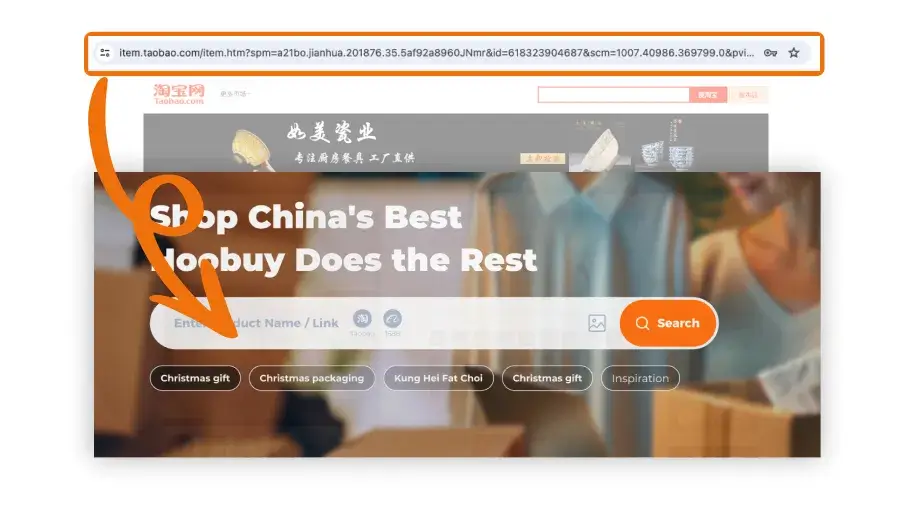
- Open Hoobuy and sign in. Paste the seller’s product URL into the product search.
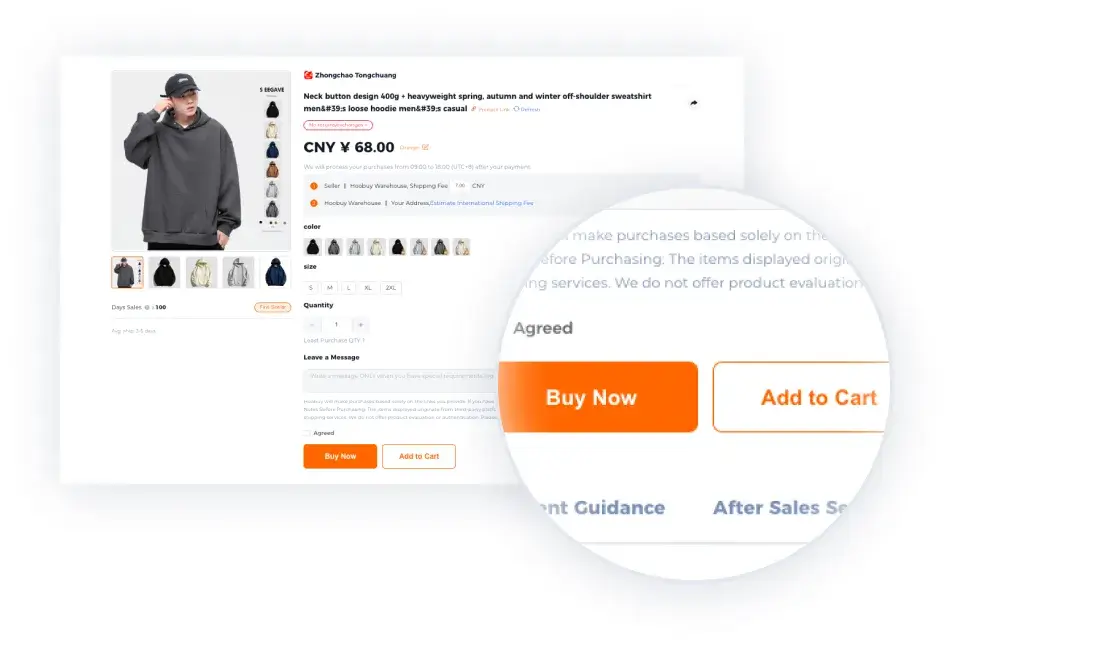
- Check the imported item and select its options again. Confirm quantity, item price and domestic delivery charge.
- Use the order remark for a specific request or an instruction to contact you if the selected option is unavailable.
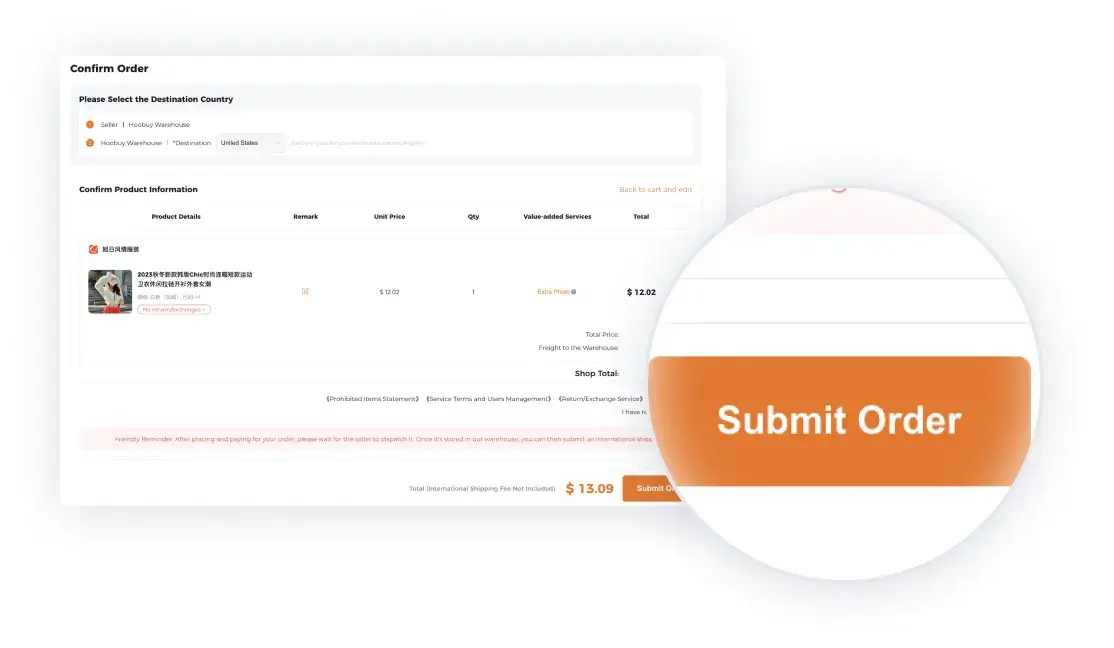
- Review the purchase total and pay using a method offered in your account. Read any follow-up message before assuming the order is complete.
If the importer cannot read the link, send the original URL and option details to Hoobuy support for assistance. If the seller is out of stock, ask about a restock or cancel that item; importing it another way does not create stock.
One blue jacket, size M. Please check that this is the option with a removable hood. Contact me before substituting another size or colour.
The purchase payment is separate from the later international parcel payment. See the full cost breakdown.
Paste the seller link
Open full-size image
Check the variant
Open full-size image
Review the purchase order
Open full-size image
The example products, prices and dates are part of the tutorial, not current offers.
Watch the purchase and domestic delivery
Check order messages for a price difference, unavailable option or clarification request. Purchased, seller dispatched and warehouse received are different stages.
If the seller has not dispatched, ask for its current estimate and your cancellation options. When the domestic carrier shows delivery, allow for the warehouse’s check-in process before expecting photos.
Review the item in the warehouse
In Hoobuy’s User Center, open the Warehouse item and its QC photos. Match the size, colour, quantity and visible details with your order.
Request another view or a measurement when a photo cannot answer your question. If you want a return or exchange, raise it promptly and keep that item out of the parcel while the agent checks the seller’s terms.
When waiting for other purchases, note the storage deadline for each item. Decide whether waiting still makes sense once storage costs and the return window are considered.
Check QC photos methodically →Submit, track and receive the parcel
Select the warehouse items you want to send together. Choose packaging and an eligible shipping route, then review the international delivery charge before payment. Keep retail packaging when it protects the item or may be needed for a return.
Save the parcel reference and tracking number. Look for carrier acceptance after label creation, and check for a local-carrier number after the international handover.
At delivery, inspect the outer packaging and item count. Keep packaging and photographs if anything is damaged or missing, and raise the issue through the parcel record.
Get help with tracking or delivery →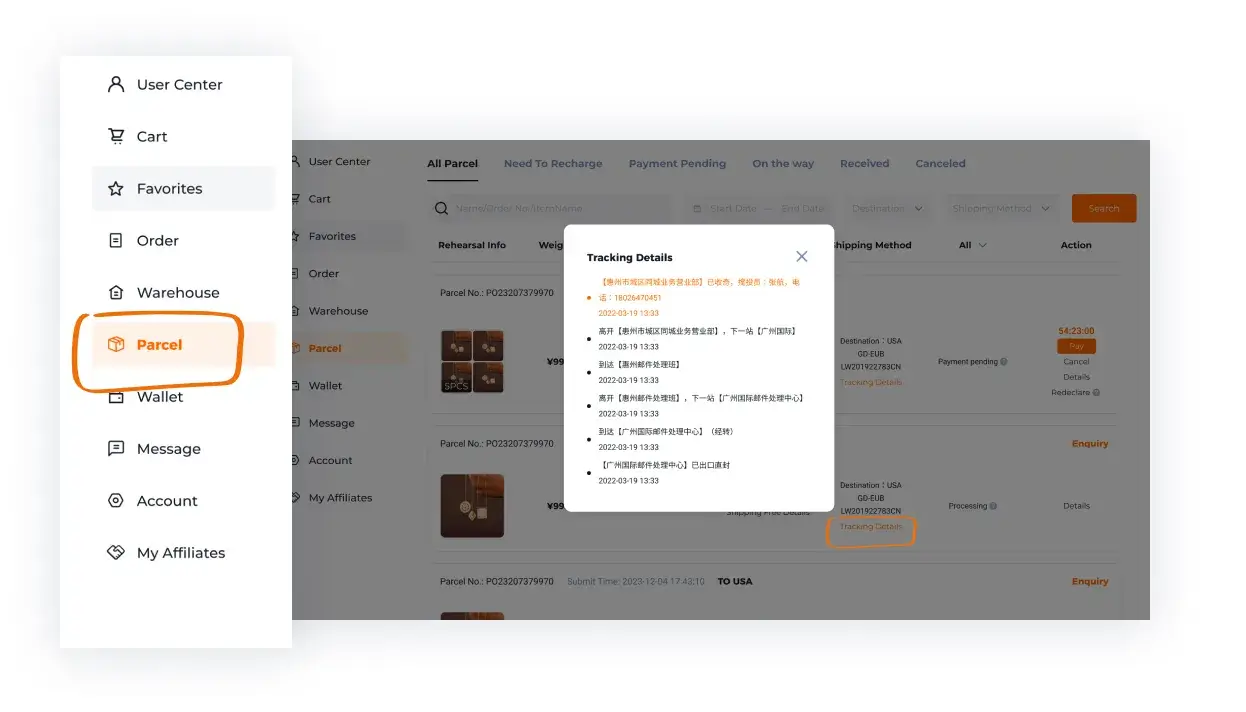
Open full-size image
How to choose the product and its options
Start with the details that affect your use: measurements for clothing, size-chart units for shoes, capacity for bags, and the exact specification for accessories or electronics. Compare those with something you own where possible.
Confirm whether the listing price covers one item, a set, an accessory or a deposit. Keep the selected size, colour, version and quantity with the source link; importing a URL does not necessarily preserve those choices.
Shopping precautions before paying or shipping
Keep the listing, selected options and order reference. Check the seller’s return terms and route restrictions before buying. Leave a separate budget for international freight and possible destination charges.
Do not send a disputed or unclear item overseas merely to combine it with the rest. Request the missing photo, measurement or return decision while the item remains in the warehouse.